1 Product Introduction
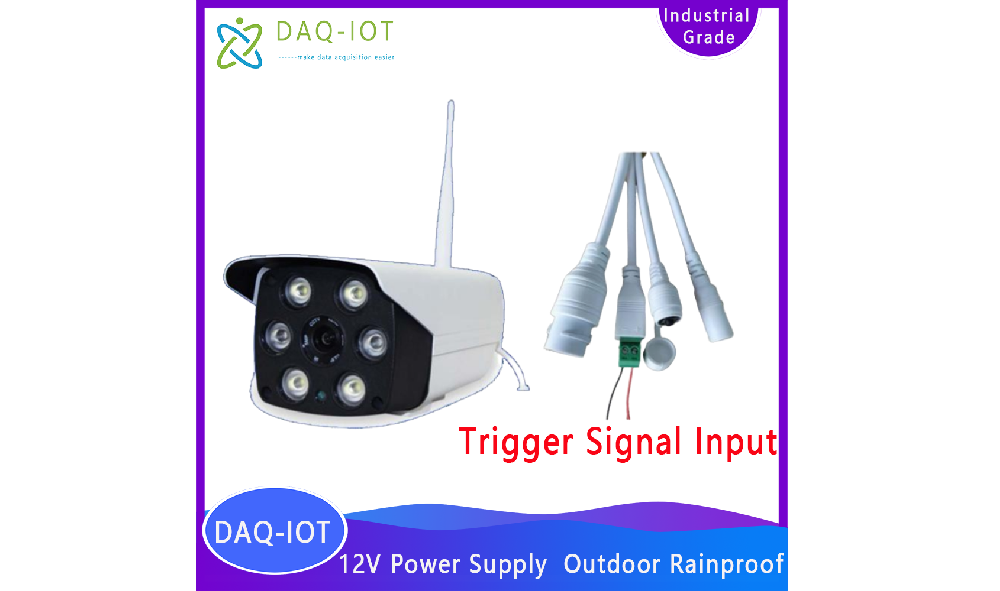
The SC-GP-CAMIO is a wireless camera based on 4G or WiFi, featuring switch signal relay-triggered timed photography and video capture with FTP and email photo upload, developed by Shanghai Data Acquisition IoT Technology Co., Ltd. It supports timed snapshots and event-triggered snapshots, making it widely applicable for instrument reading capture and recognition, as well as photo capture and video monitoring in agriculture, cultural relics, geotechnical, hydrology, and water conservancy fields.
This product supports network access via WiFi or Ethernet, timed photography, and uploading photos to a specified FTP Server or storing them on an SD card. When paired with a 4G wireless network card, it can be used in outdoor environments without WiFi coverage.
2 Service Philosophy
Our company in Zhengzhou guarantees:
You are purchasing not only a product but also comprehensive and attentive technical support services.
We provide free remote guidance and remote configuration and debugging services, transmitting data to the customer-designated server.
Free IoT solution consulting services are available!
3 Product Features and Specifications
3.1 Camera Parameters and Selection
Resolution: options of 2MP, 3MP, and 5MP; default is 2MP.
Lens: 2.8mm / 4mm / 6mm
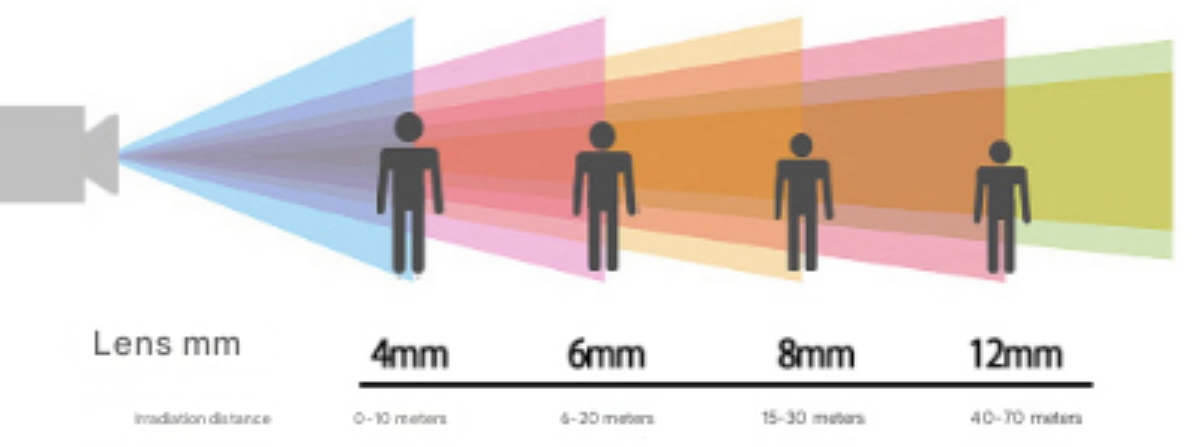
Lens Specifications | 2.8mm | 4mm | 6mm |
Monitoring Angle | 90° | 80° | 70° |
Monitoring Distance | 0~5m | 0~10m | 6~20m |
Memory Card Function: Supported
Power Supply: 12V DC
Weight: 0.35 kg
3.2 Electrical Characteristics
Power Supply Mode: 12V DC or Battery Powered
( Power Interface: DC5.5×2.1 mm Female Socket, Center Positive, Outer Negative )
3.3 Communication Characteristics
Default Network Mode: Ethernet/WiFi, 4G
Image Upload: FTP Server
3.4 Structural Features
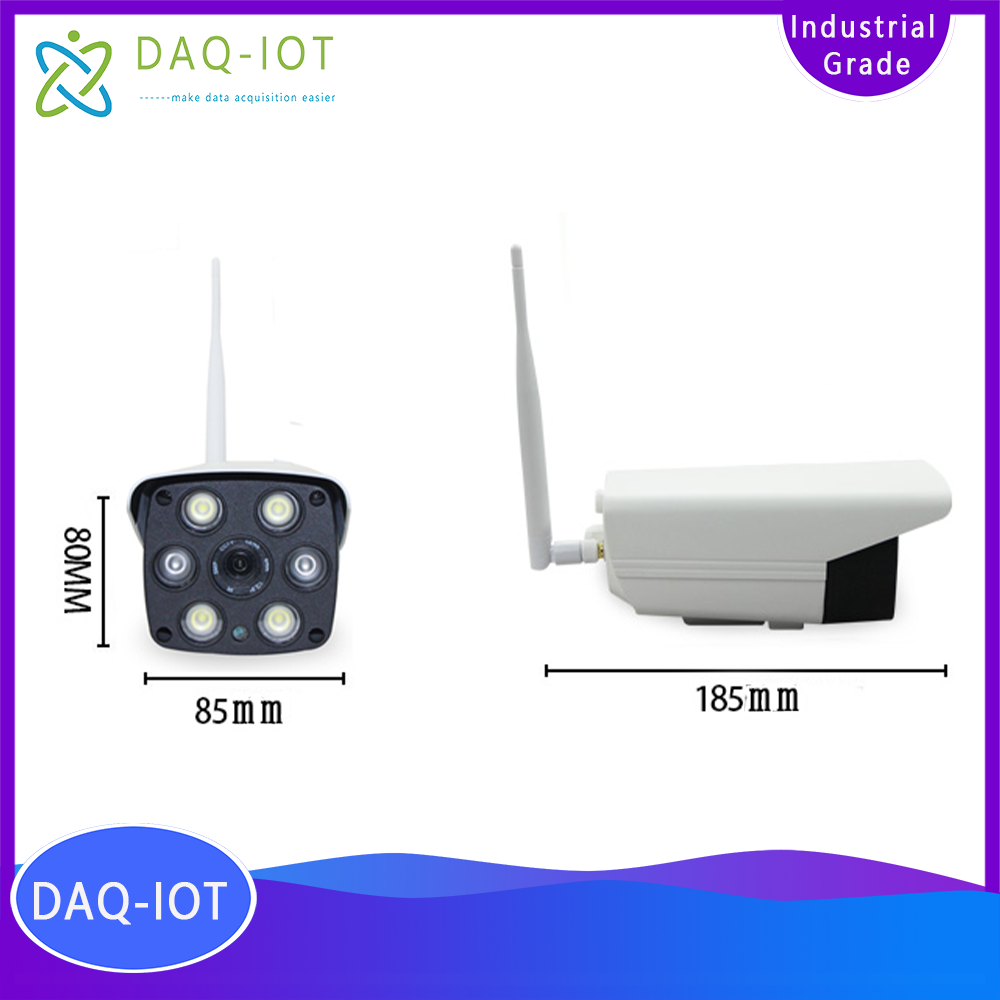
Antenna Type: Rubber Duck External Antenna
Material: PC Plastic (Housing)
Main Protection Rating: IP65
Dimensions: 185 mm × 85 mm × 80 mm
3.5 Operating Environment
Ambient Temperature: -30°C to 70°C, Humidity: 0–95% (Non-Condensing)
4 Component Matching
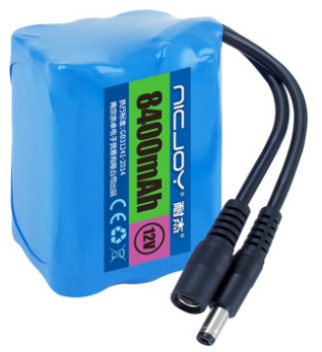
Includes 12V lithium battery pack |
|
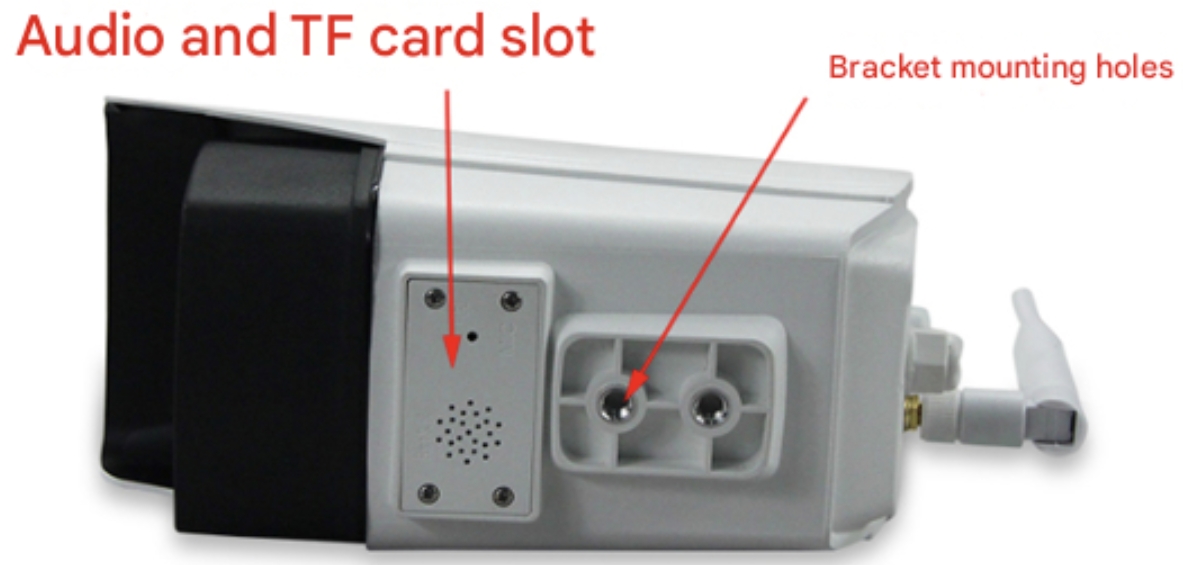
Camera bottom mounting bracket
5 Core Product Advantages
u Simple installation and rapid deployment to facilitate quick implementation of IoT projects
u Compact size
u Rainproof design suitable for outdoor environments
u Built-in supplementary lighting suitable for nighttime photography
u Supports remote parameter configuration
6 Timed Photo Upload Settings
Allows setting of any time interval to capture photos stored on the SD card or uploaded to the FTP Server.
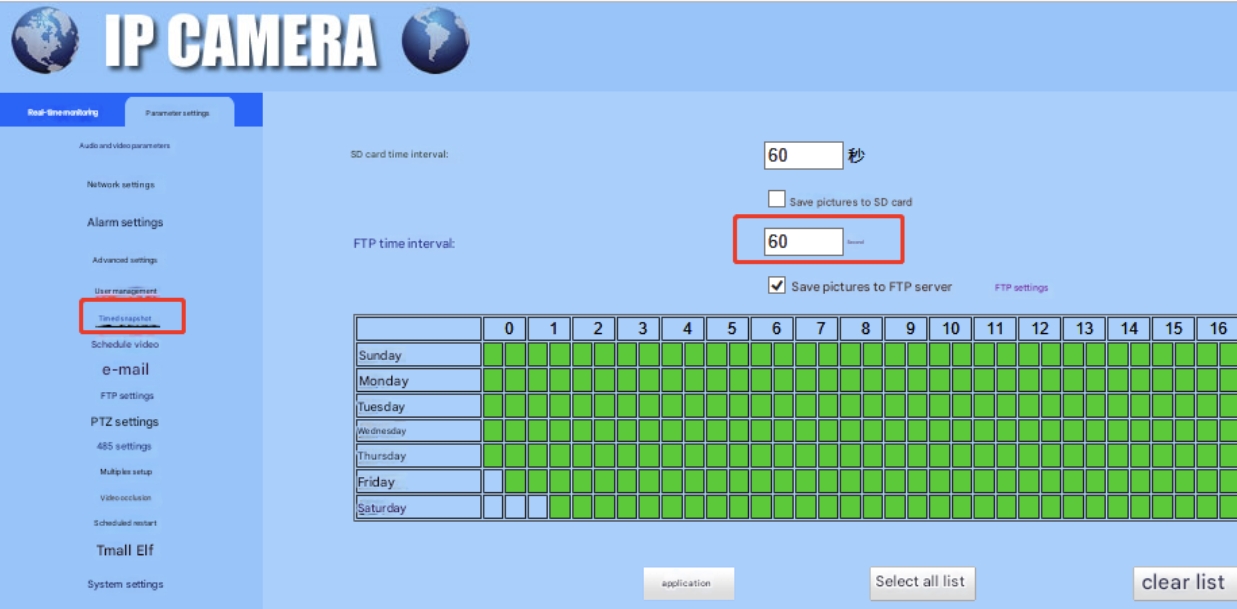
Timed photo interval setting
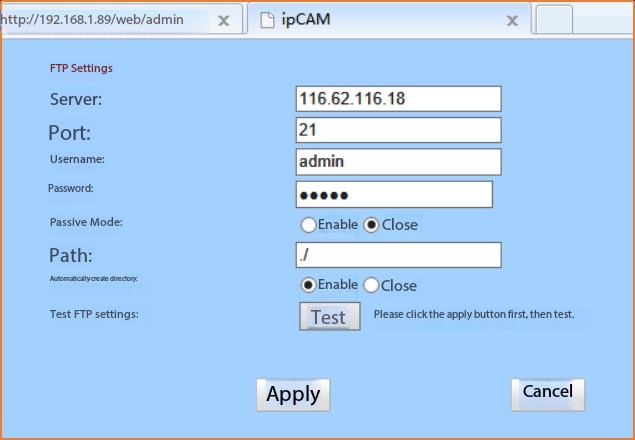
FTP parameter configuration
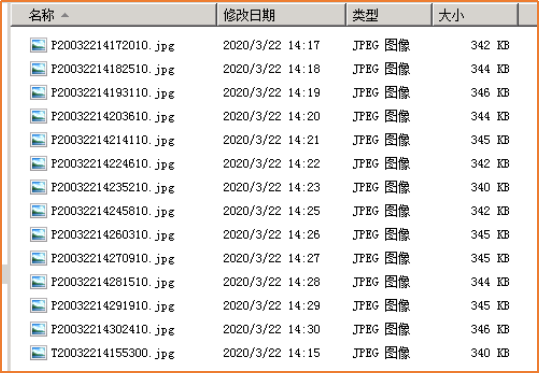
Example of image upload result
7 WiFi Camera Configuration
7.1 Connect to the computer and access the configuration interface.
Power on the camera and connect it to the computer via network cable.
Open the link https://xmeye.net/download/ocx/Active.exeDownload and install the browser control.
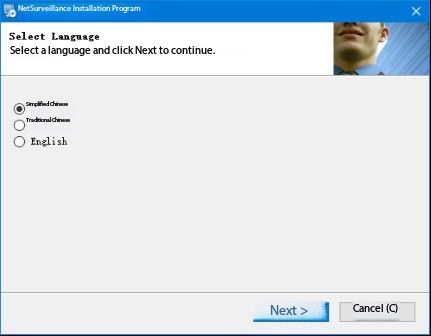
Check the IP address on the camera label; the default is 192.168.1.10 (refer to the actual camera label).
Set the computer IP to the same subnet as the camera (for example, set the computer IP to 192.168.1.211). Enter the camera IP in the browser and press Enter to access the login page. Enter the username (admin) and password (default is blank) (refer to the label on the camera for actual credentials) to log in to the configuration interface.
7.2 Trigger Photo Configuration.
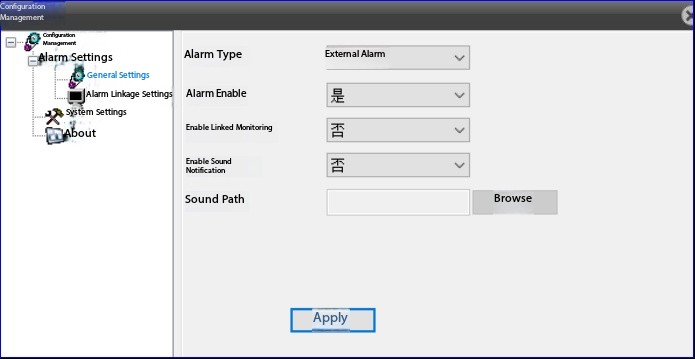
Click the main menu Client Configuration and enable external alarm.
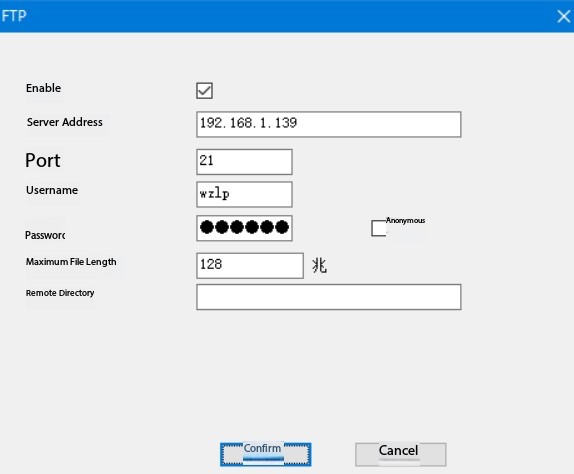
Navigate to Main Menu > Device Configuration > Settings > System Settings > Network Services, then double-click FTP to configure FTP parameters.
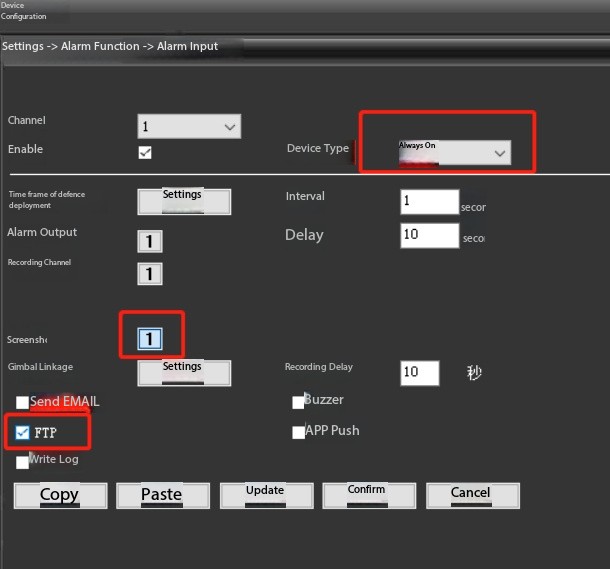
In the alarm input interface, configure the parameters as shown in the figure below.
7.3 WiFi Settings
Install the Monitoring Eye app on your mobile device, select Add Device, and configure WiFi.
App download link:

8 Application Cases
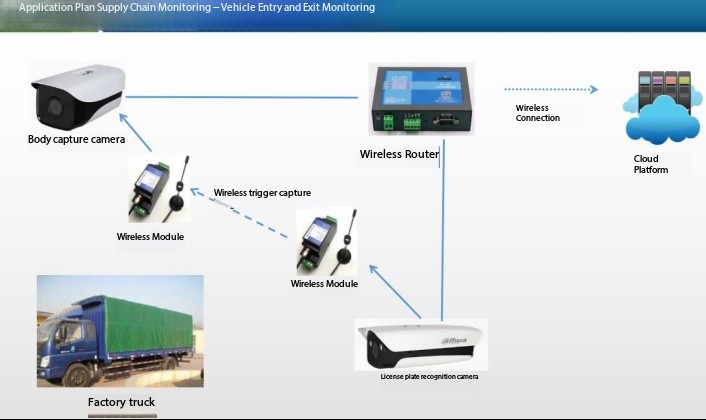
Factory Vehicle Access Monitoring
FAQ – Wireless Switch Signal Triggered Timed Photo Camera (Waterproof, Built-in Lighting)
1. What is a Wireless Switch Signal Triggered Timed Photo Camera?
It is an industrial IoT camera that automatically captures photos based on switch signals or scheduled timing. It also includes built-in supplementary lighting and waterproof housing for outdoor and industrial environments.
2. How does the trigger function work?
The camera can be triggered in two ways:
3. What is this camera used for?
It is widely used for:
Industrial equipment monitoring
Remote site inspection
Construction progress documentation
Energy and utility monitoring
Water, oil, and gas infrastructure
Smart city and IoT applications
4. Is the camera suitable for outdoor use?
Yes. The device is designed with a waterproof and dustproof enclosure (IP65/IP66 or higher depending on model), making it suitable for harsh outdoor environments.
5. Does it have night vision or lighting support?
Yes. It includes built-in supplementary lighting (LED or infrared lighting depending on model) to ensure clear image capture in low-light or night conditions.
6. Can it take photos automatically on a schedule?
Yes. The camera supports timed shooting, allowing users to set intervals such as every few seconds, minutes, or hours for automatic image capture.
7. How is the data transmitted?
Images and data can be transmitted via:
4G LTE / 5G (optional)
WiFi
Ethernet
IoT cloud platforms
8. Can it be integrated into IoT systems?
Yes. The camera can be integrated with IoT platforms, SCADA systems, and cloud monitoring systems for centralized data management and remote access.
9. Does it support remote viewing?
Yes. Users can remotely access images and system status through web platforms or mobile/cloud interfaces depending on configuration.
10. What type of signal can trigger the camera?
It supports external input signals such as:
11. Is it suitable for industrial environments?
Yes. It is designed for industrial-grade applications with:
Wide temperature tolerance
Anti-vibration design
Waterproof and dustproof housing
24/7 continuous operation
12. Can multiple cameras be managed in one system?
Yes. Multiple cameras can be deployed and managed centrally via an IoT platform or cloud-based monitoring system.
13. What are the main advantages of this camera?
Trigger-based and timed photography
Built-in supplementary lighting
Waterproof industrial design
Remote monitoring capability
Easy IoT integration
Suitable for unattended remote sites
14. What industries use this camera?
It is widely used in:
 ch
 English